Gigabyte Z890 Aorus Master AI TOP Review for Local AI Training and Intel Core Ultra Series 2
A deep dive into the hardware that bridges the gap between enthusiast gaming and professional AI workstations.
The Gigabyte Z890 Aorus Master AI TOP stands out as a top choice for prosumers who need more than a standard gaming motherboard. It is specifically optimized for local Large Language Model (LLM) training, featuring dual PCIe 5.0 x16 slots (running at x8/x8), Dual 10GbE LAN, and a robust 20+1+2 phase VRM. While it carries a premium price, its ability to handle sustained AI workloads makes it a strong contender for researchers and developers using the new Intel Core Ultra Series 2 processors.
The landscape of high-end computing is shifting. While gaming remains a primary driver for motherboard innovation, the rise of local artificial intelligence has created a new niche: the "AI Workstation" that lives on a desk rather than in a server rack. The Gigabyte Z890 Aorus Master AI TOP is the physical manifestation of this shift. It isn't just a rebranded gaming board; it is a specialized tool designed to leverage the Intel Core Ultra Series 2 architecture for sustained, heavy-duty computation.
In this review, we will explore why this board ranks among the top options for local AI development, how it differs from the standard Aorus Master, and what technical hurdles early adopters should prepare for.
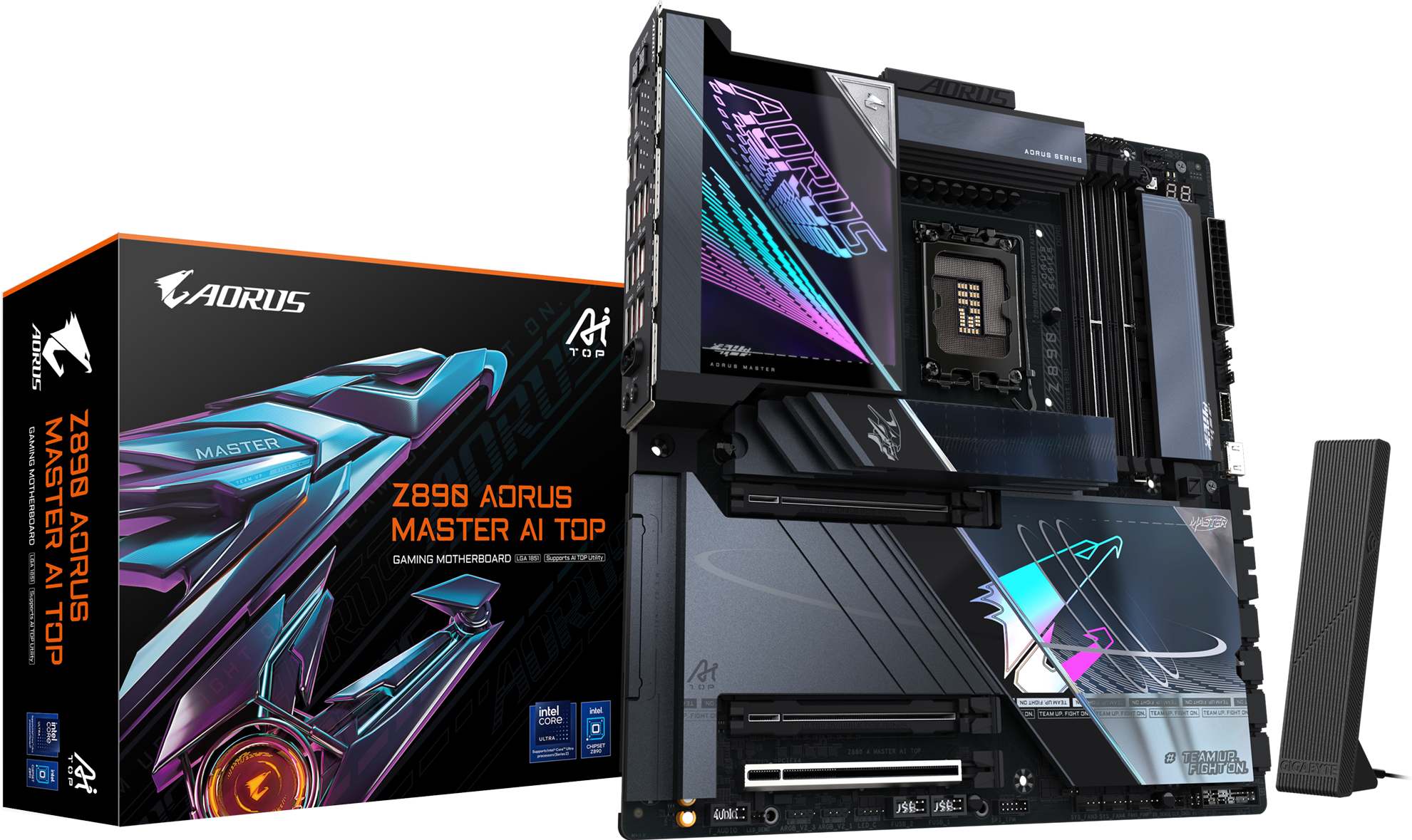
Image source: Gigabyte
What Makes the AI TOP Different from the Standard Z890 Aorus Master?
At first glance, the "AI TOP" and the standard "Master" might look identical, but the internal hardware tells a different story. Gigabyte has made specific upgrades to the AI TOP variant to handle the unique stresses of AI model training, which differs significantly from the bursty loads of gaming.
The AI TOP features a 20+1+2 phase digital VRM with 110A Smart Power Stages. This is a step up from the 18+1+2 configuration found on the standard Master, providing greater stability during multi-day training sessions.
While standard boards offer 2.5GbE or 5GbE, the AI TOP includes Dual 10GbE LAN powered by Marvell AQtion controllers. This is essential for moving massive datasets across a local network.
The AI TOP is designed for multi-GPU scaling, offering two reinforced PCIe 5.0 slots that can operate in x8/x8 mode, allowing for dual RTX 4090 or 5090 configurations.
| Feature | Z890 Aorus Master | Z890 Aorus Master AI TOP |
|---|---|---|
| VRM Phases | 18+1+2 (110A) | 20+1+2 (110A) |
| LAN Ports | 1x 10GbE + 1x 5GbE | 2x 10GbE (Marvell AQtion) |
| PCIe 5.0 Slots | 1x x16 | 2x x16 (x8/x8 mode) |
| AI Software | Basic GCC | AI TOP Utility 2.0 |
| Memory Cooling | Passive | DDR Wind Blade (Active) |
According to official technical specifications, these hardware changes are not just for show. The dual 10GbE ports, for instance, utilize the Marvell AQC113C controller, which is widely regarded as a reliable choice for high-bandwidth workstation environments.
How the LGA 1851 Socket and Intel Core Ultra Series 2 Work Together
It is crucial to note that the Z890 chipset introduces the LGA 1851 socket. This means the board is not compatible with 14th Gen, 13th Gen, or older Intel processors. If you are upgrading, you must pair this board with an Intel Core Ultra Series 2 (Arrow Lake) CPU.
The synergy between the Z890 chipset and the new Series 2 processors is what enables the AI TOP's capabilities. The Arrow Lake architecture provides more dedicated PCIe lanes for storage and peripherals, which Gigabyte has routed to support a PCIe 5.0 M.2 slot without stealing bandwidth from the primary GPU slot in most configurations (though using the second x16 slot will still result in x8/x8 bifurcation).
For AI researchers, the new NPU (Neural Processing Unit) integrated into the Core Ultra CPUs works alongside the motherboard's hardware to handle background AI tasks, leaving the heavy lifting of LLM training to the discrete GPUs. This division of labor is a significant advancement in how consumer-grade hardware handles complex computational workflows.
Why Dual PCIe 5.0 Slots Matter for Local LLM Training
One of the most common questions regarding the Z890 Aorus Master AI TOP is how the dual PCIe 5.0 slots function. In a standard Z890 board, you typically get one PCIe 5.0 x16 slot. The AI TOP, however, splits these lanes.
The x8/x8 Bifurcation Explained
When you install two GPUs, the motherboard automatically splits the 16 lanes from the CPU into two x8 paths. While "x8" might sound like a downgrade, it is important to remember that PCIe 5.0 x8 provides the same bandwidth as PCIe 4.0 x16. For modern GPUs like the NVIDIA RTX 4090, this bandwidth is more than sufficient for AI training tasks, where VRAM capacity and memory bus width are usually the primary bottlenecks, not the PCIe interface itself.
Multi-GPU Scaling for LLMs
Local LLMs, such as Llama 3 or Mistral, require massive amounts of VRAM. A single RTX 4090 with 24GB of VRAM can run many models, but training or fine-tuning larger models requires pooling the memory of two or more cards. The AI TOP's physical layout is designed to accommodate two triple-slot GPUs with enough breathing room for airflow, a feature often missing from standard gaming boards.
Pushing DDR5 Memory to 9500 MT/s with Active Cooling
Memory speed is a critical factor in AI performance, particularly for data preprocessing and model inference. The Z890 Aorus Master AI TOP supports DDR5 speeds up to 9500 MT/s via overclocking. To achieve these speeds reliably, Gigabyte has introduced two key technologies:
- D5 Bionic Corsa: An AI-enhanced signal routing technology that minimizes interference, allowing for higher stable clocks on the memory modules.
- DDR Wind Blade: A physical, active cooling fan that clips over the RAM slots.
During sustained AI training, memory modules can become exceptionally hot. Heat leads to instability and potential data corruption. The inclusion of the DDR Wind Blade is a practical admission that high-speed DDR5 requires active thermal management when pushed to its limits. For users running 256GB of RAM (4x 64GB modules), this active cooling is highly recommended to maintain system stability over long epochs.
How to Use the AI TOP Utility 2.0 for Large Language Models
The hardware is only half the story. The "AI TOP" branding also refers to the AI TOP Utility 2.0, a software suite designed to simplify the process of local AI development. According to Aorus marketing materials, this utility allows users to train models with up to 236 billion parameters locally.
Offloading Logic and VRAM Management
One of the biggest hurdles in local AI is the "Out of Memory" (OOM) error. The AI TOP Utility 2.0 uses intelligent offloading logic to manage data between the GPU's VRAM, the system's DDR5 RAM, and even high-speed NVMe storage. This allows the system to process models that would normally be too large for the available VRAM, albeit at a slower speed than a pure VRAM workflow.
AORUS AI SNATCH
This feature uses an onboard AI model to monitor system stability and performance. It can auto-overclock the CPU and memory based on the specific requirements of the AI task being performed. Unlike traditional auto-overclocking, which targets peak gaming frames, AI SNATCH focuses on sustained throughput and thermal headroom.
Managing Heat During Long AI Training Sessions
Thermal throttling is the enemy of productivity. The Z890 Aorus Master AI TOP addresses this through an aggressive thermal design. The VRM is covered by a Fins-Array III heatsink with a NanoCarbon coating, which increases the surface area for heat dissipation.
Furthermore, the M.2 Thermal Guard XL is a massive heatsink for the primary PCIe 5.0 SSD. High-speed Gen5 drives are notorious for overheating and throttling down to Gen1 speeds. In an AI context, where the system is constantly reading and writing large datasets (checkpoints), keeping the storage cool is just as important as keeping the GPU cool.
The 8-layer, 2X Copper PCB also plays a role here. By using thicker copper layers for the power and ground planes, the motherboard itself acts as a heat sink, spreading thermal energy away from hotspots like the CPU socket and VRM phases.
Common BIOS Problems and How to Fix Them
Being an early adopter of the Z890 platform comes with challenges. Community findings on platforms like Overclock.net have highlighted several quirks that users should be aware of.
- The 1.40V XMP Limit: Many users have reported that the "200S boost" feature in the BIOS fails to initialize if the memory XMP profile requires more than 1.40V. If your high-end RAM kit is rated for 1.45V, you may need to manually tune the voltage or wait for a BIOS update.
- QFlash Plus Necessity: Early BIOS versions shipped with the board may have issues with the Gigabyte Control Center (GCC) software update tool. It is widely recommended to use the physical QFlash Plus button on the rear I/O to update the BIOS before installing the CPU and RAM.
- Fixing Boot Loops: If you encounter an infinite boot loop after a BIOS update, a manual CMOS clear is often required. The AI TOP includes a dedicated "Clear CMOS" button on the back, which simplifies this process significantly.
Frequently Asked Questions
- Does this board support 14th Gen Intel CPUs?
- No. The Z890 Aorus Master AI TOP uses the LGA 1851 socket, which is exclusively compatible with Intel Core Ultra Processors (Series 2). Older LGA 1700 processors will not fit and are not electrically compatible.
- Can I run two RTX 4090s on this board?
- Yes, the board is designed for this. The two primary PCIe 5.0 slots will run in x8/x8 mode. Because PCIe 5.0 x8 has the same bandwidth as PCIe 4.0 x16, there is no performance penalty for current-generation GPUs.
- What is the main difference between the Aorus Master and the AI TOP version?
- The AI TOP version adds an extra 2 VRM phases (20+1+2), dual 10GbE LAN ports (instead of one 10GbE and one 5GbE), active memory cooling (DDR Wind Blade), and the AI TOP Utility software suite for LLM training.
- Do I really need the DDR Wind Blade fan?
- If you are running standard XMP profiles around 6000-7200 MT/s, it may not be necessary. However, for AI training or high-speed overclocking above 8000 MT/s, the active cooling is highly recommended to prevent thermal instability.
- How many M.2 slots are available for storage?
- The board features four M.2 slots in total: one PCIe 5.0 x4 slot and three PCIe 4.0 x4 slots. All slots are covered by heatsinks to prevent thermal throttling during heavy data transfers.
The Gigabyte Z890 Aorus Master AI TOP is a specialized piece of hardware that fills the gap between high-end gaming and professional workstations. While it may be overkill for a pure gaming build, its unique features make it a compelling choice for a specific audience.
- Optimized for AI: The dual PCIe 5.0 slots and AI TOP Utility make local LLM training accessible on a desktop.
- Workstation Networking: Dual 10GbE LAN is a significant upgrade for users handling large datasets.
- Robust Power: The 20+1+2 phase VRM ensures stability under sustained 100% loads.
- Active Cooling: The DDR Wind Blade addresses the thermal realities of high-speed DDR5 memory.
- Socket Specificity: Remember that this board requires the new LGA 1851 Intel Core Ultra Series 2 CPUs.
- Early Adopter Quirks: Be prepared to use the QFlash Plus button and manage memory voltages manually in the current BIOS versions.
If you are an AI researcher or a developer looking to move away from cloud-based training costs, this motherboard provides the necessary hardware foundation to build a powerful local workstation.
All trademarks, copyrighted content, and quoted material referenced in this article belong to their respective owners. Brief excerpts are used under fair use (17 U.S.C. § 107) for purposes of commentary, criticism, and informational reporting. This article is not affiliated with or endorsed by Gigabyte or Intel.