Is the Gigabyte Z890 Aorus Master AI TOP Worth It for Local AI Training?
The Gigabyte Z890 Aorus Master AI TOP stands out as a top-tier choice for professionals building desk-side AI workstations. Unlike standard gaming boards, it features dual PCIe 5.0 x16 slots in an x8/x8 configuration, enabling multi-GPU scaling for Large Language Models (LLMs) up to 236B parameters. While it sacrifices one M.2 slot compared to the standard Master, its 20+1+2 phase VRM and Dual 10GbE LAN make it a premier foundation for sustained computational workloads.
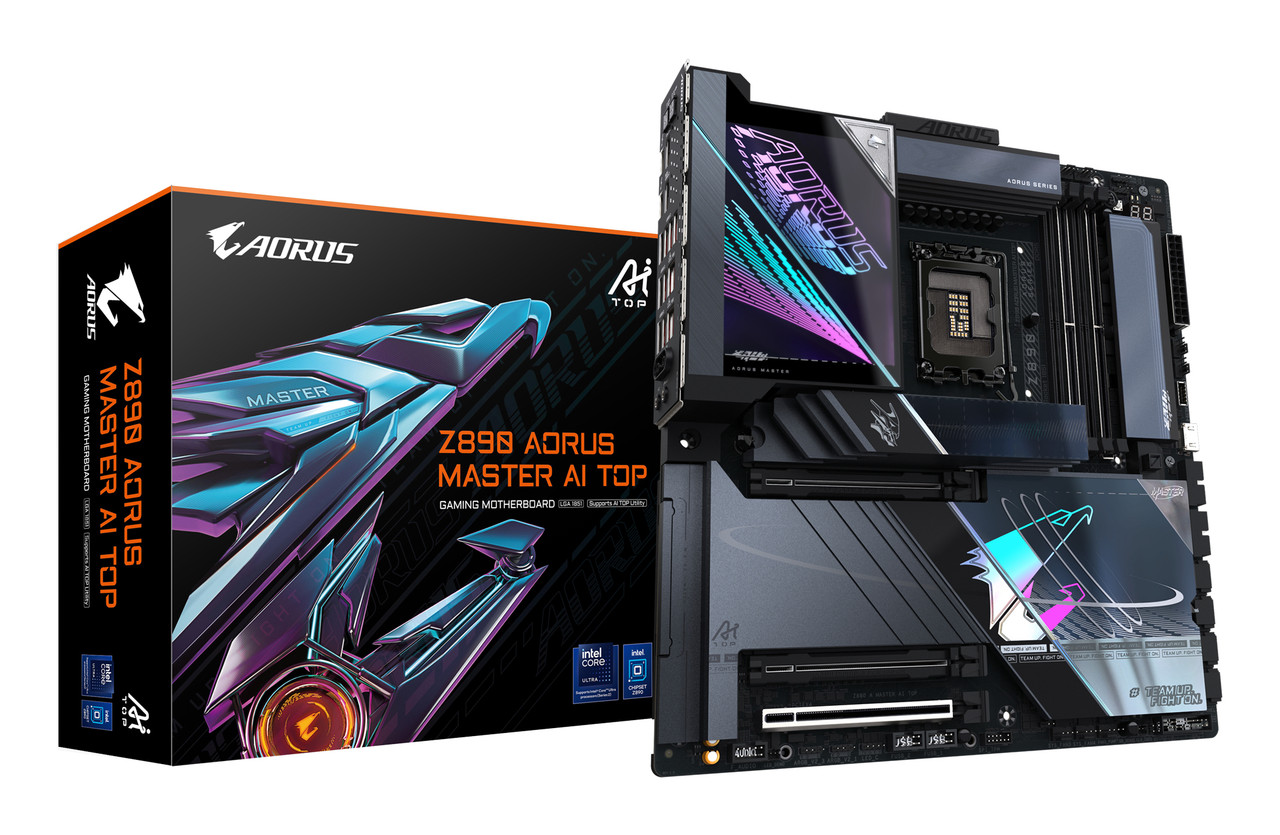
Image source: AORUS Official Store
What Makes the Z890 Aorus Master AI TOP Different from Standard Boards
In the landscape of the Intel Core Ultra Series 2 (Arrow Lake) launch, Gigabyte has introduced a specific SKU branding: AI TOP. While many motherboards claim "AI features" through software, the Z890 Aorus Master AI TOP implements hardware-level changes designed for local machine learning. According to Gigabyte's official specifications, this board is a specialized tool for "desk-side AI training," moving beyond the typical gaming or content creation focus.
The Core Value Proposition for Local Machine Learning
The primary reason to consider the AI TOP variant over the standard Z890 Aorus Master is the ability to run two high-end GPUs at PCIe 5.0 speeds. In a standard Z890 configuration, the primary slot gets 16 lanes, while secondary slots often drop to PCIe 4.0 x4 or even x1. The AI TOP bifurcates the CPU's 16 PCIe 5.0 lanes into two x8 slots. For AI training, where GPU-to-GPU communication and VRAM capacity are bottlenecks, having two RTX 5090 or 4090 cards running on a high-bandwidth bus is a significant advancement.
Furthermore, the board is designed to support private AI workflows. By utilizing the AI TOP Utility 2.0, users can fine-tune open-source models like Llama-3 or Mistral locally. This approach offers a strong alternative to cloud-based AI services, providing better data privacy and eliminating recurring subscription costs for developers working with sensitive datasets.
How the AI TOP Hardware Compares to the Standard Aorus Master
When comparing the AI TOP to the standard Master, the differences are subtle but impactful for professional stability. The most notable upgrade is in the power delivery system. While the standard Z890 Aorus Master utilizes an 18+1+2 phase design, the AI TOP variant steps up to a 20+1+2 phase digital VRM solution. Each phase is equipped with 110A Smart Power Stages (SPS), ensuring that the motherboard can handle the sustained, 100% load typical of training an LLM for 48 hours straight.
The PCIe Lane Trade-off and Storage Implications
There is no such thing as a free lunch in motherboard design. To enable the dual x8/x8 PCIe 5.0 configuration, Gigabyte had to reallocate lanes that would normally go to storage. As noted in technical reviews, the AI TOP features 4 M.2 slots, whereas the standard Master offers 5. If your workflow requires maximum NVMe storage density, the standard Master might be a better fit. However, for AI, the trade-off of one M.2 slot for a second high-speed PCIe slot is widely considered a logical choice.
VRM Overbuilding for Sustained Computational Loads
The 20+1+2 phase design isn't just about peak power; it's about thermal efficiency. By spreading the current across more phases, each individual component runs cooler. This is critical for the LGA 1851 socket and the Arrow Lake architecture, which can be sensitive to voltage fluctuations under heavy multi-threaded loads. The AI TOP also includes a dedicated DDR Wind Blade—an active cooling fan for the memory slots—to prevent thermal throttling during high-speed memory operations.
Why Dual PCIe 5.0 x16 Slots Matter for AI Workloads
For most gamers, a single x16 slot is sufficient. However, AI training is a "VRAM-hungry" process. Training a 70B parameter model requires more memory than a single consumer GPU provides. By using two GPUs, you effectively double your available VRAM. The Z890 Aorus Master AI TOP facilitates this by providing two physical x16 slots that share the CPU's PCIe 5.0 lanes.
Bandwidth Distribution and Multi-GPU Scaling
In the x8/x8 configuration, each GPU has access to approximately 32GB/s of bandwidth (PCIe 5.0). This is equivalent to a full PCIe 4.0 x16 slot, which is more than enough to prevent bottlenecks in multi-GPU scaling. When training models using frameworks like PyTorch or TensorFlow, the synchronization between GPUs happens over the PCIe bus. The AI TOP ensures this synchronization happens at the lowest possible latency allowed by the Z890 chipset.
Structural Integrity for Heavy Graphics Cards
Modern flagship GPUs are heavy, often weighing over 2kg. Installing two of these can put immense strain on a motherboard. Gigabyte addresses this with the PCIe UD Slot X, which features a backplate-bolted design. According to Aorus technical data, this slot offers 10x the load-bearing strength of standard slots. This is a critical feature for a board designed to house two heavy AI-focused cards simultaneously.
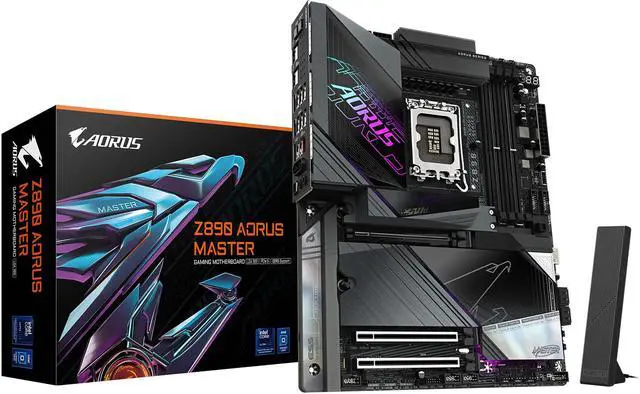
Image source: Newegg
Can the Z890 Aorus Master AI TOP Really Hit 9500 MT/s?
Gigabyte has made bold claims regarding memory speeds, citing support for up to 9500 MT/s via their "D5 Bionic Corsa" technology. This is an AI-driven approach to signal integrity, where the BIOS automatically tunes memory parameters to find the highest stable frequency for your specific kit. While these numbers are impressive, real-world application requires a nuanced understanding of the Arrow Lake architecture.
D5 Bionic Corsa Technology and Signal Integrity
The D5 Bionic Corsa system uses machine learning models to predict the best sub-timings for DDR5 modules. On the Z890 Aorus Master AI TOP, this is paired with a daisy-chain memory trace layout that minimizes signal interference. For AI developers, high memory bandwidth is beneficial for data preprocessing and moving large datasets from system RAM to GPU VRAM. However, hitting 9500 MT/s typically requires high-binned CUDIMM modules and a very strong CPU integrated memory controller (IMC).
Arrow Lake Latency Reality and Community Findings
Enthusiast communities on platforms like Overclock.net have noted that while Arrow Lake can hit high frequencies, achieving sub-50ns latency is difficult. This is due to the tile-based architecture and the latency characteristics of the E-core clusters. For AI training, raw bandwidth (MT/s) is generally more important than ultra-low latency, making the AI TOP's focus on high-frequency stability a top-tier choice for this specific niche.
How to Fix Stability Issues and BIOS Confusion
One of the most common pitfalls for early adopters of the Z890 platform is BIOS configuration, specifically regarding voltage rails. Community feedback suggests that "Auto" settings on Gigabyte boards can sometimes lead to instability when using XMP profiles above 8000 MT/s. Understanding the distinction between various voltage settings is key to a stable AI workstation.
The VCCIO vs VCCIOG Trap in Gigabyte BIOS
A frequent point of confusion in the Gigabyte BIOS is the presence of VCCIO and VCCIOG (Gated). For the Z890 platform, the standard VCCIO in the CPU section is often not the primary driver for memory stability. Instead, users must look for the VCCIOG setting located within the DRAM Voltage sub-menu. Tweaking this gated voltage is often the difference between a system that BSODs under load and one that passes a 24-hour stress test.
Manual Voltage Headroom for High-Speed Memory
To stabilize high-speed DDR5, we recommend the following manual adjustments if "Auto" fails:
- Identify the VCCIOG: Navigate to the Advanced Memory Settings and locate the Gated VCCIO rail.
- Set a Baseline: For 8000 MT/s, a VCCIOG of 1.35V to 1.40V is typically a safe starting point.
- Monitor Transients: Use a tool like HWiNFO64 to ensure the voltage doesn't droop under heavy AVX-512 or AI workloads.
- Adjust SA Voltage: The System Agent (SA) voltage may need a slight bump to 1.25V-1.30V to support the high-speed IMC.
The Software Ecosystem for Private AI Training
The "AI TOP" moniker isn't just about the hardware; it includes a software suite designed to lower the barrier to entry for local AI. The AI TOP Utility 2.0 acts as a control center for downloading, quantizing, and fine-tuning open-source LLMs. This is particularly useful for researchers who want to keep their data off public servers.
AI TOP Utility 2.0 and Model Fine-Tuning
The utility provides a dashboard that monitors GPU VRAM usage, system RAM, and training progress. It supports popular formats like GGUF and EXL2, allowing users to fit larger models into their VRAM through quantization. For example, a 70B model that might normally require 140GB of VRAM can be quantized to 4-bit or 8-bit to fit within the 48GB provided by two RTX 4090s. The Z890 Aorus Master AI TOP is specifically optimized to handle the high data throughput required during these quantization processes.
Intel NPU Integration and Background Task Offloading
The Intel Core Ultra Series 2 processors include a dedicated Neural Processing Unit (NPU). The AI TOP motherboard fully supports the Intel NPU and GNA (Gaussian Neural Accelerator) drivers. While the GPUs handle the heavy lifting of training, the NPU can be used to offload background AI tasks like noise cancellation, background blur in video calls, or simple text-to-speech, ensuring that 100% of the GPU resources remain dedicated to the training task.
Networking and Connectivity for Large Datasets
AI training involves massive datasets, often ranging from hundreds of gigabytes to several terabytes. Moving these files from a Network Attached Storage (NAS) to your local workstation can be a bottleneck if you are limited to standard 1GbE or 2.5GbE networking.
Dual 10GbE LAN for High-Speed Data Ingestion
The Z890 Aorus Master AI TOP is one of the few consumer-grade boards to feature Dual 10GbE LAN powered by Aquantia controllers. This allows for a theoretical transfer speed of 1.25GB/s per port. For a professional AI workflow, this means you can ingest a 1TB dataset in under 15 minutes, whereas a standard 2.5GbE port would take nearly an hour. The dual ports also allow for network redundancy or dedicated links to a high-speed storage server.
Wi-Fi 7 and Thunderbolt 4 Connectivity
Beyond wired networking, the board includes Wi-Fi 7 with a directional ultra-high gain antenna. This is useful for environments where running a 10GbE cable is not feasible. Additionally, the Dual Thunderbolt 4 ports provide 40Gbps of bandwidth for external storage arrays or high-resolution displays. A unique feature for enthusiasts is the Sensor Panel Link, an internal HDMI port that allows you to connect a small LCD screen inside your case to monitor real-time AI training metrics without using an external monitor port.
Thermal Management for Multi-GPU Setups
Heat is the enemy of performance, especially when two high-end GPUs are sandwiched together in a workstation. The Z890 Aorus Master AI TOP utilizes an E-ATX form factor, providing the extra width necessary for better airflow and component spacing.
E-ATX Form Factor and Airflow Considerations
The E-ATX layout allows Gigabyte to space the PCIe slots further apart than a standard ATX board. This is crucial for dual-GPU setups, as it provides a "breathing room" gap between the cards, preventing the top card from choking on the hot exhaust of the bottom card. When building in an E-ATX case, this extra space significantly improves the longevity of the GPU fans and maintains higher boost clocks during long training sessions.
Active Cooling Solutions for Memory and Storage
The board features the M.2 Thermal Guard XL, a massive heatsink for the primary PCIe 5.0 NVMe slot. PCIe 5.0 SSDs are notorious for running hot, often requiring active cooling to prevent throttling. By integrating a high-surface-area heatsink, the AI TOP ensures that your data ingestion remains fast. The aforementioned DDR Wind Blade also plays a role here, keeping the memory modules cool even when the surrounding air is heated by two powerful GPUs.
Comparison Table for Z890 Aorus Motherboards
| Feature | Z890 Aorus Master | Z890 Aorus Master AI TOP | Z890 Aorus Pro Ice |
|---|---|---|---|
| VRM Phases | 18+1+2 (110A) | 20+1+2 (110A) | 16+1+2 (90A) |
| PCIe 5.0 Config | x16 / x4 / x4 | x8 / x8 | x16 / x4 / x4 |
| M.2 Slots | 5 (1x Gen5) | 4 (1x Gen5) | 4 (1x Gen5) |
| Ethernet | 10GbE + 2.5GbE | Dual 10GbE | 5GbE |
| Max RAM Speed | 9200 MT/s | 9500 MT/s | 8800 MT/s |
| Form Factor | ATX | E-ATX | ATX |
Frequently Asked Questions
Does the Z890 Aorus Master AI TOP support NVLink?
No, NVLink is no longer supported on consumer-grade NVIDIA GeForce cards (RTX 30 series and newer). The Z890 Aorus Master AI TOP uses the PCIe 5.0 bus to facilitate communication between GPUs. While this is not as fast as a dedicated NVLink bridge, the high bandwidth of PCIe 5.0 x8 is more than sufficient for most local AI training and inference tasks using modern frameworks like PyTorch.
Can I use five M.2 SSDs on this motherboard?
No, the AI TOP variant is limited to four M.2 slots. This is a intentional design choice to free up PCIe lanes for the second x16 slot (running at x8). If you require five M.2 slots for high-density storage, the standard Z890 Aorus Master is a better choice, though you will lose the ability to run dual GPUs in an x8/x8 configuration.
Is the 10GbE LAN useful for gaming or just AI?
For gaming, 10GbE offers minimal benefits as most game servers and home internet connections do not exceed 1Gbps or 2.5Gbps. However, for AI and professional content creation, 10GbE is highly impactful. it allows for rapid transfer of massive datasets from a local NAS, which is a common requirement in machine learning workflows.
What is the difference between VCCIO and VCCIOG in the BIOS?
VCCIO is a general voltage rail for input/output operations, while VCCIOG (Gated) is a specific rail that controls the voltage for the memory controller's gated logic on the Z890 platform. For stabilizing high-speed DDR5 (8000+ MT/s), community testing shows that adjusting VCCIOG is far more effective than touching the standard VCCIO rail.
Do I need a special power supply for this motherboard?
Because the AI TOP is designed for dual-GPU setups, you should use a high-wattage ATX 3.1 power supply (1200W or higher). Ideally, look for a unit that provides two native 12V-2x6 connectors to power two RTX 4090 or 5090 cards without the need for messy adapters, ensuring better power delivery and safety.
- Prioritize the AI TOP only if your workflow requires dual-GPU x8/x8 PCIe 5.0 support for LLM training.
- Manual BIOS tuning of the VCCIOG rail is often necessary to stabilize DDR5 memory speeds above 8000 MT/s.
- Verify case compatibility for the E-ATX form factor, as this board is wider than standard ATX motherboards.
- Leverage Dual 10GbE to eliminate bottlenecks when ingesting large datasets from high-speed network storage.
- Utilize the AI TOP Utility 2.0 to simplify the process of local model quantization and fine-tuning.
- Expect a storage trade-off, as this board offers 4 M.2 slots instead of the 5 found on the standard Master model.
For those building a dedicated local AI workstation, the Gigabyte Z890 Aorus Master AI TOP provides the specific hardware bifurcation and power delivery needed to turn a desktop PC into a powerful private research tool.